- {{get_started_text}}
- {{manual_text}}
- {{application_text}}
- {{voice_control_text}}
- {{firmware_text}}
- FAQ
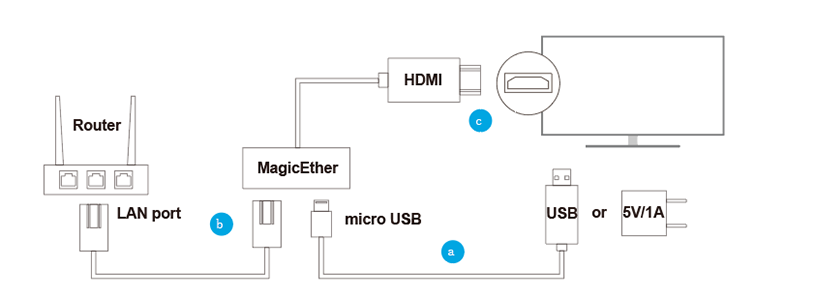
MagicEther產品安裝示意圖
1. 安裝 MagicEther
(a) MagicEther 連接至電源
使用 MicroUSB 充電線將 MagicEther 與(5V/1A)USB電源適配器(或者手機充電器)連接,以提供電源。
(b) 連接至網路
用網路線將 MagicEther 連接至路由器。
(c) MagicEther 連接至電視/螢幕顯示器/投影機
將 MagicEther 的 HDMI 接頭連接至電視/螢幕顯示器/投影機的 HDMI 連接埠。
2. 選擇訊號源
選擇已經連接 MagicEther 的 HDMI 訊號源。
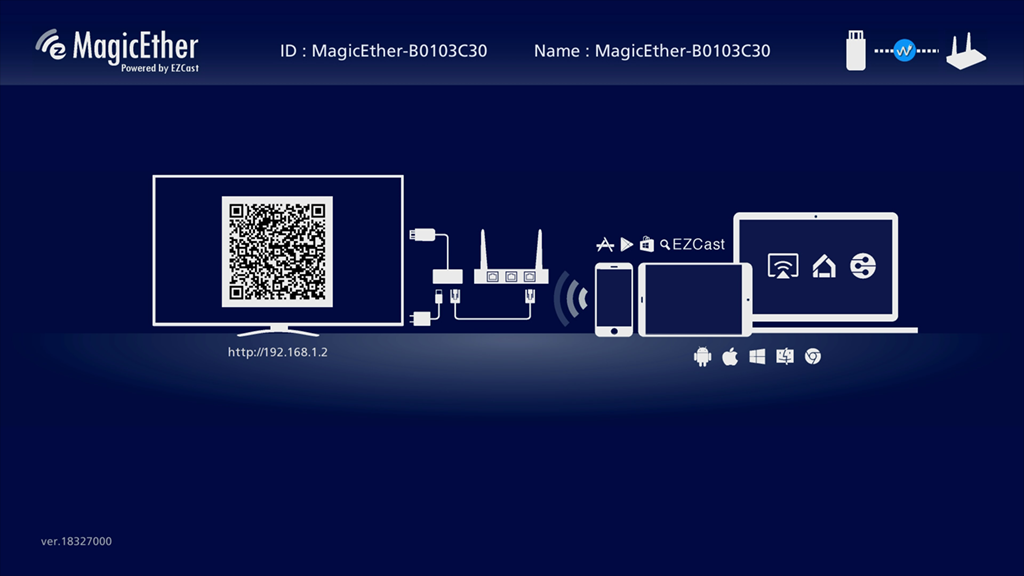
3. 連接成功
MagicEther 連接成功後,螢幕將會顯示如圖所示的畫面。
MagicEther产品安装示意图
1. 安装MagicEther
(a) MagicEther连接电源
用micro-USB电源线将MagicEther和手机充电器(5V/1A)连接。
(b)联网
用网线将MagicEther与路由器连接。
(c) MagicEther连接电视机/显示器/投影仪
将MagicEther的HDMI插入电视机/显示器/投影仪的HDMI接口。
2. 选择信号源
选择已经连接MagicEther的HDMI信号源。
3. 连接成功提示
若MagicEther连接成功,屏幕将显示如图所示中的画面。
MagicEther Hardware Installation
1. (a) MagicEther to power
Connect the micro USB port to power via USB port.
(b) Connect to Internet
Connect to the LAN port of your router.
(c) MagicEther to TV
Plug MagicEther dongle into a HDMI port on TV.
2. Set your TV’s source/input selection to HDMI port connected to the MagicEther dongle.
3. Your TV screen shall display the instructions once MagicEther is connected successfully.
Please follow the instructions to complete setup.